
1.Program description
Cowork Texting is a messaging program operated by Fluid Tech, Inc. (“Fluid”, “we”, “us”). It lets administrators of a Fluid store text Cowork, the AI teammate in Fluid admin, to ask questions, create tasks, and have Fluid’s Mist agents run them. Messages include Cowork’s replies, task confirmations and updates, and links to view your work in Fluid. Cowork Texting does not send sign-in codes, store analytics, sales data, or marketing messages.
Cowork Texting is available only to signed-in administrators of a Fluid store account.
2.How you opt in
You can join Cowork Texting only while signed in to your Fluid account, from either place:
- Fluid admin (admin.fluid.app): in Cowork, choose Text Cowork.
- Fluid mobile app: Profile > Text Cowork.
This opens the Text with Cowork dialog. You may enter the US or Canadian mobile number you will text from; this is optional, and if you enter one, only that number can be linked. Before anything is sent, you see this consent wording next to a checkbox that is never pre-checked, with links to these Terms and our Privacy Policy:
“I agree to receive Cowork Texting messages from Fluid about my store, including replies and task updates from Cowork. Message frequency varies. Message and data rates may apply. Reply STOP to opt out, HELP for help.”
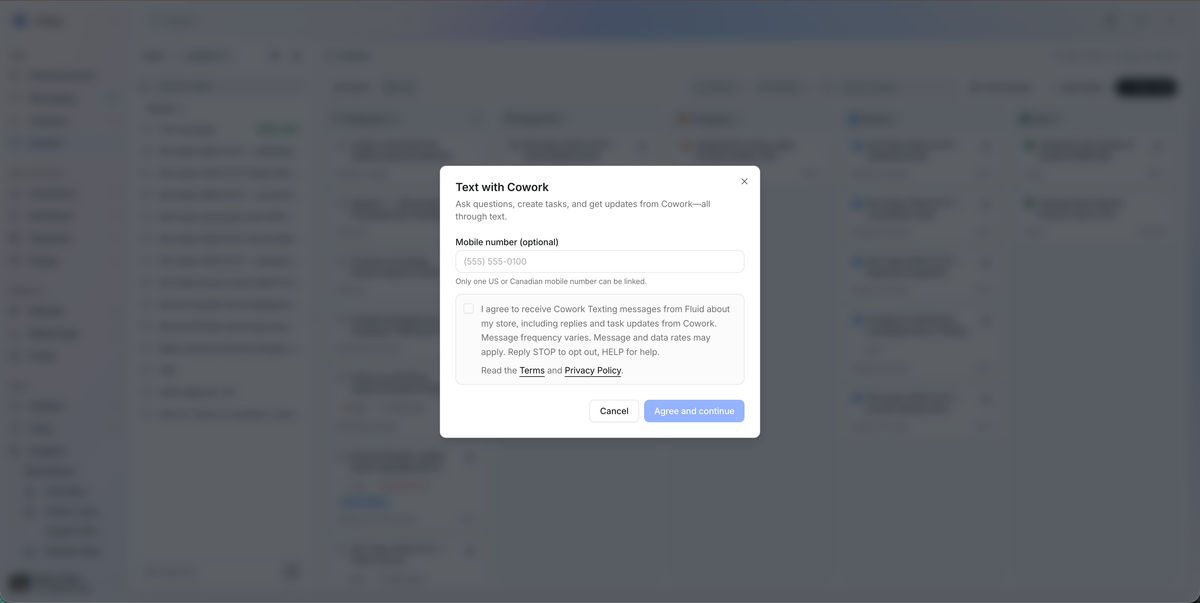
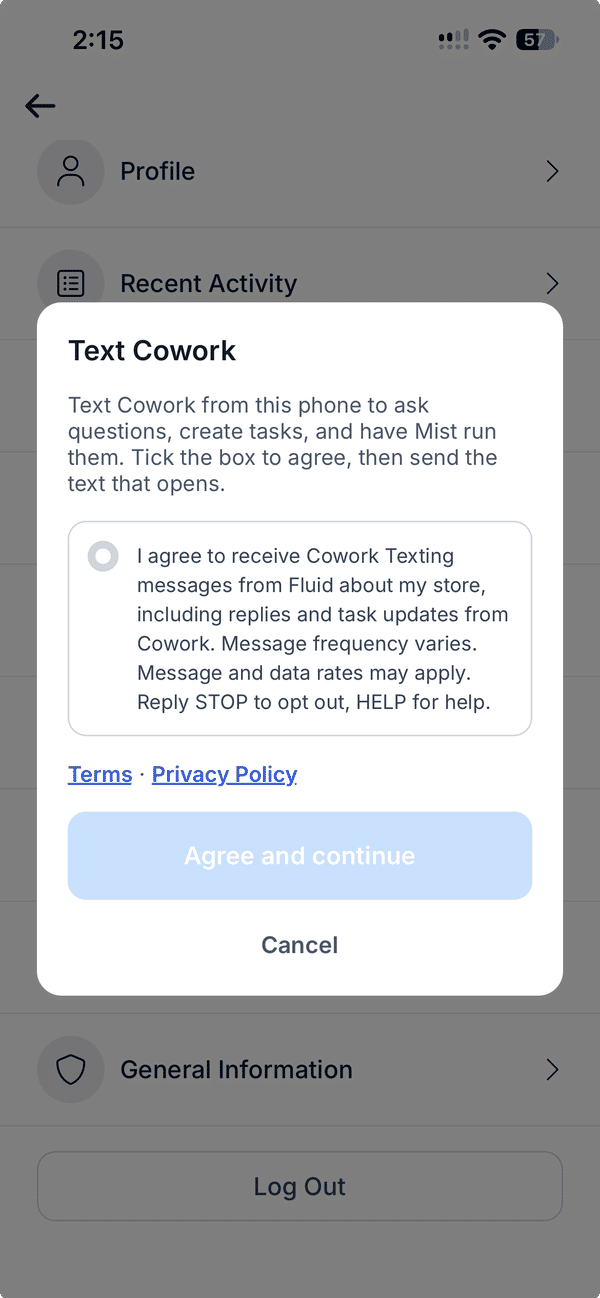
After you tick the box and choose Agree and continue, you send Fluid’s number a prefilled message containing a one-time code. In the Fluid mobile app, your phone’s messaging app opens with that message ready to send. In Fluid admin on a computer, scan the QR code shown with your phone to open the same message; if you entered a mobile number, send it from that phone. We then email a one-time code to the email address on your Fluid account, and you reply to our text with it to finish. Your number is linked only after this step. Consent is not a condition of purchase or of using Fluid.
3.Message frequency
Message frequency varies. How many messages you receive depends on how often you text Cowork and the tasks you create.
4.Costs
Fluid does not charge for Cowork Texting messages. Message and data rates may apply according to your mobile carrier and plan. You are responsible for any charges from your carrier.
5.How to opt out
You can cancel at any time. Text STOP to the number you receive Cowork Texting messages from. After you send STOP, we will send you one message to confirm that you have been unsubscribed, and you will receive no further Cowork Texting messages. You can also unlink your number in Settings > Cowork Texting.
To join again, repeat the opt-in steps in your Fluid admin.
6.Getting help
If you have trouble with the program, reply HELP for help, or contact Fluid support at docs.fluid.app/help/getting-help or support@fluid.app.
7.Carrier disclaimer
Carriers are not liable for delayed or undelivered messages. Delivery depends on your carrier’s network and coverage, and we cannot guarantee that every message will be delivered.
8.Your responsibilities
You agree to link only a mobile number that you own or are authorized to use, and to unlink it or text STOP if you change or give up that number. Do not text Cowork sensitive information it doesn’t need, such as full payment card numbers or passwords.
9.Privacy
We never share your mobile number or opt-in consent with third parties or affiliates for marketing purposes. To learn how we collect and use your information, see the Cowork Texting Privacy Policy.
10.Changes to these terms
We may update these terms or end the program at any time. When we do, we will change the effective date above and, for material changes, notify linked administrators. If you keep using Cowork Texting after a change, you accept the updated terms.