

International commerce used to begin with a project plan, not a checkout. One team member gathered local requirements with attorneys. Another worked through alternative payment method integrations. Someone else drafted the policies and agreements a direct selling business needed. Each answer became a dependency in a project-management system. The work could stretch across months before the first shopper in that country placed an order.
“International markets was my growth plan at Herbalife. Getting one country live meant months of work with a whole team of people, and we called that fast.”
The cost wasn’t just waiting. The tax answer could change the price display. The payment answer could change checkout. A new agreement could send the copy back for another review. When each market also meant another storefront, the team had one more catalog, currency, and set of pages to maintain.
Country Atlas puts the country brief in one place. Fluid’s database maps currency, tax, payment methods, agreements, checkout fields, and a launch checklist for 225 countries in 6 regions. Mist reads the brief, asks for the choices it cannot know, and shows your team a plan. Nothing changes until your team approves. The Fluid Atlas page describes the configuration launch as taking 6 to 9 minutes; legal review, registrations, and payment-provider accounts still follow your team’s schedule.
What’s inside Country Atlas.
Each country page brings the market’s requirements together:
- Currency and tax. The currency, how tax is named and shown, and whether prices include tax.
- Consumer-protection rules. Cooling-off and warranty periods, cookie consent, and subscription disclosure.
- Checkout. Address fields with local labels and whether card payments need 3-D Secure.
- Payment methods. The methods people in that country use, in the order checkout presents them.
- Languages and agreements. The languages to support and the legal text the market expects.
- Enrollment fields. The fields the market calls for when a new rep joins.
- Launch checklist. The registrations, licenses, and filings for each operating mode.
Italy shows how the brief works: IVA included in prices, EUR, a 14-day cooling-off period, and 6 agreements. Its payment-method plan includes cards with Postepay, PayPal, Satispay, and Klarna. Read the Italy brief.
Three ways into a market.
Each country brief lays out three operating modes and their launch checklists.
| Mode | What it means |
|---|---|
| NFR (Not For Resale) | Charge in local currency while keeping your home entity, with the local terms the country expects. |
| OTG (On The Ground) | A local entity, local tax registration, and in-country operations. |
| USD (Cross-border) | Sell into the country from your existing entity. |
Mist prepares the launch. Your team approves it.
Tell Mist to open Italy. It reads the Atlas, then asks for the operating mode, entity, and warehouse. It shows the plan before anything changes. After your team approves, Mist translates the storefront, checkout, and agreements into Italian, converts product prices to EUR at your approved rate, loads the local payment methods, and opens the country for your field. It then hands you the launch checklist.
That is the configuration launch described as 6 to 9 minutes on the Country Atlas page. The legal, provider, and operational work that depends on your business remains with your team. The Open a country guide shows the setup steps.
One storefront for international commerce.
Opening a country does not require another Fluid storefront. You manage the catalog in one place while setting the countries and local-currency prices for products and variants. The same storefront serves the markets you open, rather than making your team maintain a separate store for each currency. You can restrict storefront content to specific countries and translate it for each language.
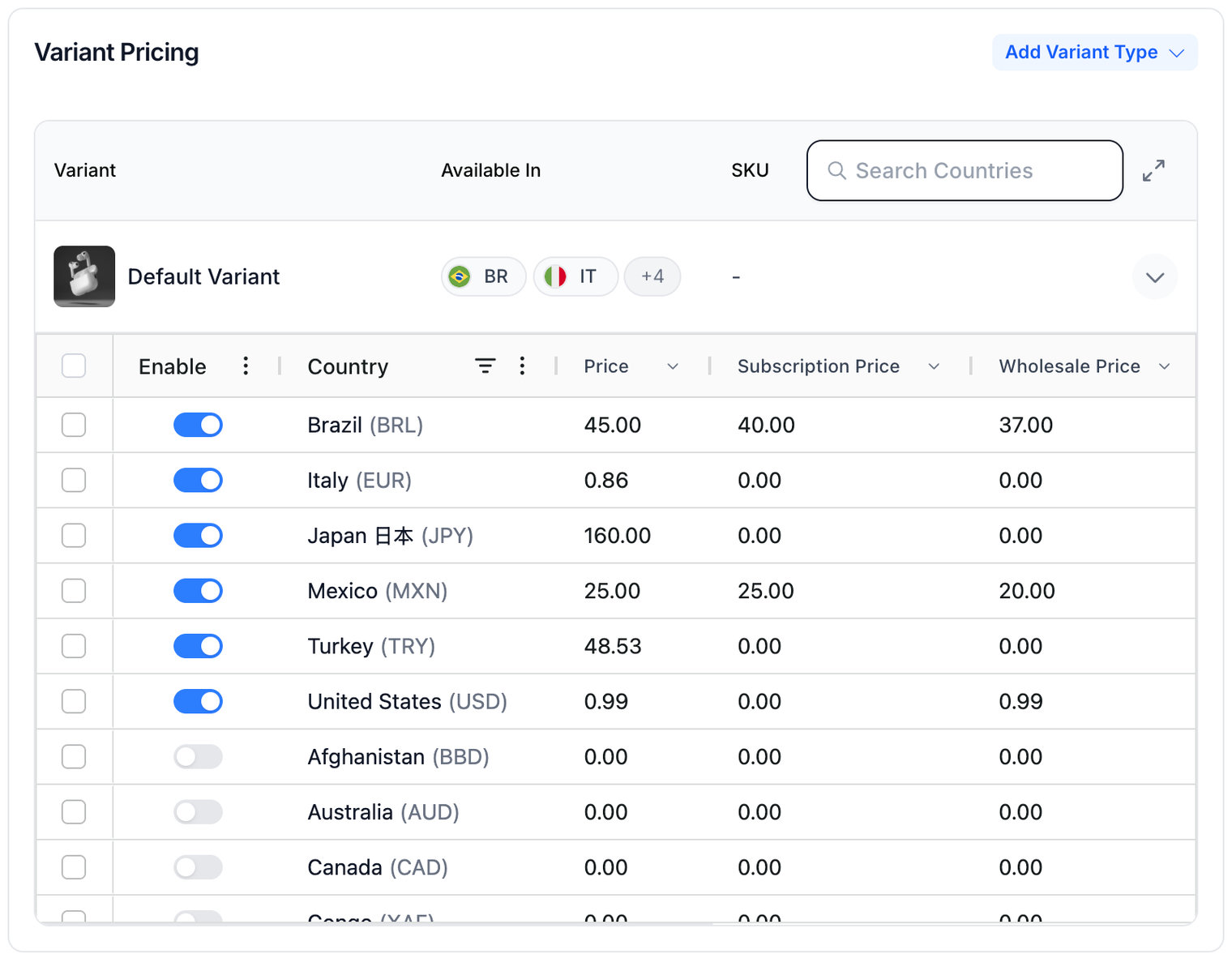
Each row is a country. Turn it on, set the price in that country’s currency, and the same product sells there from the same storefront. Subscription and wholesale prices sit in the same row.
What stays with your team.
- Payment provider accounts. Atlas identifies local methods. Your team connects providers with its own account details.
- Local registrations. On The Ground operations require local tax registration and in-country setup.
- Agreement review. Atlas text is a starting point, not legal advice. A qualified reviewer checks it for your business.
- Products on sale. You choose which products to offer in the new country.
Questions about Country Atlas.
What is Country Atlas?
It is Fluid’s database of tax, currencies, payment methods, agreements, checkout fields, and launch checklists for 225 countries.
How long does a country launch take?
The Atlas page describes Mist’s approved configuration launch as taking 6 to 9 minutes. Provider accounts, registrations, and legal review take place on your team’s schedule.
Do I need a separate store for each country or currency?
No. Fluid serves the countries you open from one storefront, with country-specific product availability and local-currency pricing.
Who approves Mist’s plan?
Your team. Mist shows the plan before it changes the country setup.
Is Atlas legal advice?
No. Have a qualified professional review the agreements and launch checklist for your business.
Bring us the country you’re planning to open. We’ll show you the plan Mist prepares for it. Get a demo or browse the Atlas.