How AG1 runs a verified 25% teacher discount page
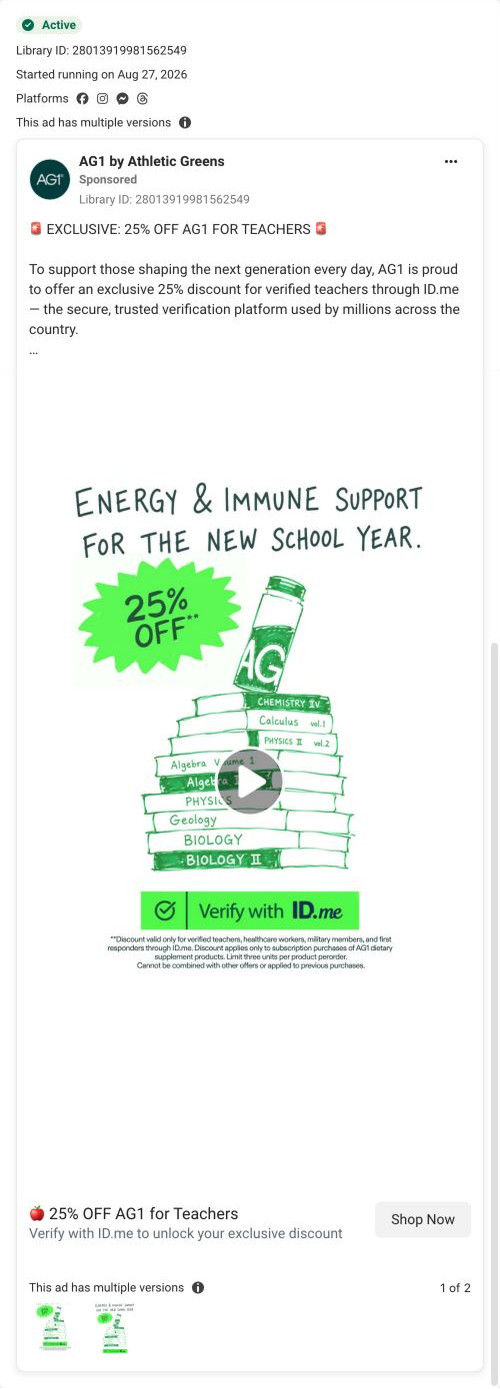
AG1's teacher page sells a 25% discount gated by ID.me verification. The hero and a three-step row explain how to claim it, then reviews, a comparison table, a three-product lineup, endorsements and ten verification FAQs follow. One teacher-targeted video ad in the Fluid library sends people here: "25% OFF AG1 for Teachers".

A browser shopping-extension badge appears in the upper-right margin of this capture.
The AG1 teacher offer
AG1's teacher page sells a 25% discount gated by ID.me verification. The hero and a three-step row explain how to claim it, then reviews, a comparison table, a three-product lineup, endorsements and ten verification FAQs follow. One teacher-targeted video ad in the Fluid library sends people here: "25% OFF AG1 for Teachers".
- Brand
- AG1
- Page type
- Audience-specific page
- Ads leading here
- 1
- Captured
- Oct 19, 2026
- Destination
- drinkag1.com
Selected for its design and offer structure. Ad performance isn’t available in this collection.
What this page does well
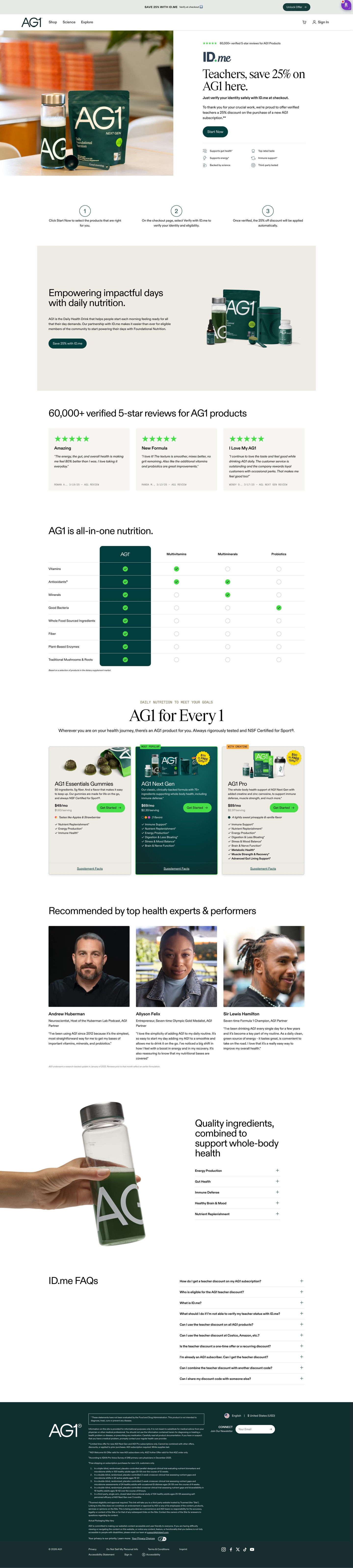
The first screen confirms the offer exactly as the ad stated it: a headline addressing teachers with the percent off, the ID.me logo beside it, a bold line on verifying at checkout and a thank-you paragraph. Directly under the hero, a three-step row (choose products, verify at checkout, discount applied automatically) explains the mechanics before anyone has to ask. The FAQ is ten accordions on eligibility, verification, stacking with other offers and sharing codes, which are the objections a gated offer creates, not general product questions. A three-card lineup with the middle option highlighted and tagged Most popular lets verified shoppers pick a product once the offer is clear.
How the page is built
- 01Announcement bar
One line on the verification discount with an Unlock Offer button.
- 02Header
Logo, three nav links, cart and sign in.
- 03Hero
A headline addressing teachers with the discount sits beside the ID.me logo, a verify-at-checkout line, a thank-you paragraph and Start Now, answering is this offer for me.
- 04How to claim
Three numbered steps answer how do I actually get the discount.
- 05Brand band
A headline on daily nutrition and a paragraph on the verification partnership sit beside a product-family photo.
- 06Reviews
A review count headline and three cards answer do people like it.
- 07Comparison table
The product is set against three supplement categories on eight rows, answering why this instead of separate supplements.
- 08Product lineup
Three cards (gummies, the core powder, a pro version) with prices and Get Started buttons answer which product should I choose.
- 09Endorsements
Three expert and athlete portrait cards with quotes answer who else recommends it.
- 10Benefits split
A photo of the drink beside five benefit accordions.
- 11Verification FAQs
Ten accordions on eligibility, verification, stacking and sharing answer the doubts a gated offer creates.
- 12Footer
Disclaimer, footnotes, locale selector, newsletter and links.
What's missing, in the order we'd fix it
- Step one of the claim row is choose products, but the product lineup sits eight sections down. Move the lineup up to right after the claim steps, so a teacher can act on step one immediately.
- The reviews and endorsements are general, with nothing from teachers. Add two or three reviews from verified teachers near the hero, so the audience sees people like them.
How the ads set it up
The ad's "25% OFF AG1 for Teachers" line reappears in the hero headline next to the ID.me logo, so the first screen confirms the offer word for word. The claim steps and the FAQ then handle the doubt every gated discount creates (am I eligible, how does verification work, does it stack). It's a clean example of an audience offer carried from ad to page without losing the specifics.
What to borrow for your brand
- Name the audience and the discount in the headline right beside the verification partner's logo, so a gated offer feels legitimate on the first screen.
- Put a three-step how-to-claim row directly under the hero that ends with the discount applying automatically.
- Write the FAQ about eligibility and verification instead of the product, because those are the objections a gated offer raises.
Ads that send people here
Captured from drinkag1.com in October 2026 for the Fluid Inspiration Library. Offers and prices change; this is what the page showed when we captured it.