

Lavendersloveee with MedicubeSponsored
Esc
How Medicube's eye cream page turns a creator routine into a set
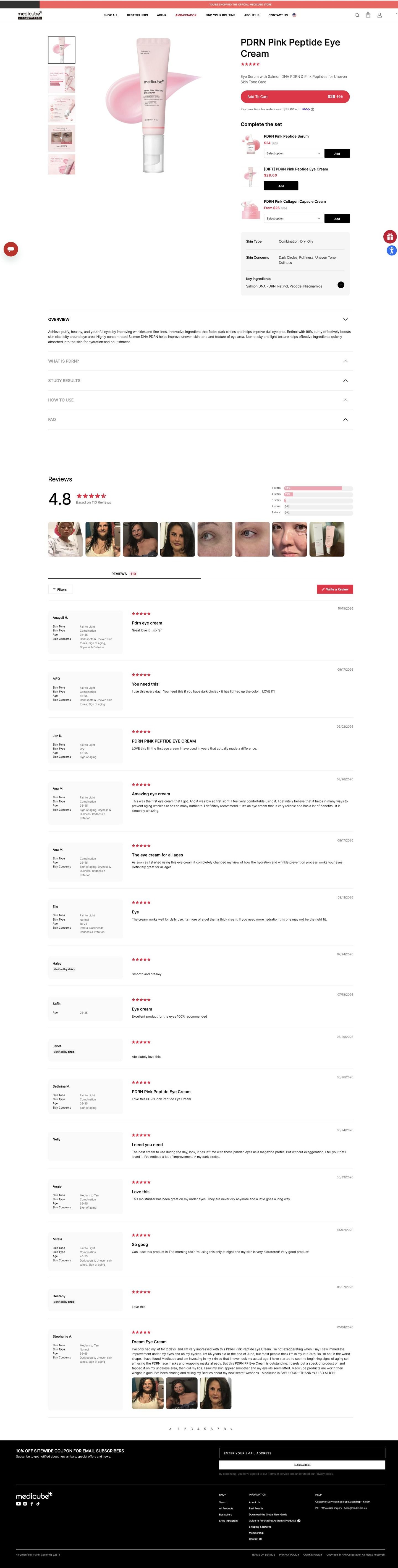
Medicube's PDRN Pink Peptide Eye Cream page is a compact skincare product page: price inside Add to Cart, a Complete the set list with a gift item, a spec card, accordions and a long review list tagged with skin profiles. One Medicube ad in the Fluid library links here, a creator eye-care routine featuring several products.
Medicube
1 creative lead here1 / 1
PDRN Pink Peptide Eye Cream
Page captured October 20, 2026. The current offer may differ from the original ad.
PDRN Pink Peptide Eye Cream
Medicube's PDRN Pink Peptide Eye Cream page is a compact skincare product page: price inside Add to Cart, a Complete the set list with a gift item, a spec card, accordions and a long review list tagged with skin profiles. One Medicube ad in the Fluid library links here, a creator eye-care routine featuring several products.
- Brand
- Medicube
- Page type
- Product page
- Ads leading here
- 1
- Captured
- Oct 20, 2026
- Destination
- medicube.us
Selected for its design and offer structure. Ad performance isn’t available in this collection.
What this page does well
The page turns the ad's multi-product routine into an easy add-on. Right under Add to Cart (which carries the struck-through and sale price, with a pay-over-time line), Complete the set lists related items, each with its own option dropdown and black Add button, and one is framed as a gift. The gallery mixes infographics and before-and-after images beside a product shot with a texture swatch, so the first screen shows both the product and what the brand says it does. The spec card answers "is this for me?" inside the buy column, and each review sits beside the reviewer's skin tone, type, age range and concerns.
How the page is built
- 01Announcement bar and header
An official-store line and a nav with best sellers, an ambassador link and a routine finder confirm the brand's own shop.
- 02Buy box
Infographic and before-and-after thumbnails, a product shot with a swatch, the name, rating, description and an Add to Cart with the sale price answer what it is and what it costs.
- 03Complete the set
Rows with thumbnails, prices, option dropdowns and Add buttons, including a gift item, answer what to pair with the cream.
- 04Spec card
Skin type, concerns and key ingredients answer whether it suits you.
- 05Accordions
An open overview with the page's benefit claims, followed by ingredient, study results, how-to-use and FAQ panels for detail.
- 06Reviews header
Average rating with count, distribution bars and a customer photo strip give a quick read on what buyers think.
- 07Review list
Each review sits beside a profile card of skin tone, type, age range and concerns, answering whether it worked for someone like you.
- 08Newsletter and footer
An email-signup coupon offer gives undecided visitors a reason to stay in touch.
What's missing, in the order we'd fix it
- The ad opens on eye patches, and the page leads with the cream alone. Make sure the patch from that opening frame is the first row in Complete the set (or offer the routine as one bundle), so the visitor can buy what they saw in one click.
- How to use is closed, and a routine ad sets up a where-does-this-go-in-my-routine question. Pull the order of steps into a short line near the spec card.
- There's no subscribe option. An eye cream gets used up, so a subscribe-and-save choice under Add to Cart turns a first order into a repeat one.
How the ads set it up
The creator's ad walks through an eye-care routine with several products, and the page catches that with a Complete the set list right under the buy button, including a gift item. It's a strong handoff, because the page lets you rebuild the routine without leaving the buy column. What's missing is the routine itself: the page sells pieces, and the ad sold the sequence.
What to borrow for your brand
- When your ad shows a routine, put every product from it in a Complete the set list directly under Add to Cart, each with its own Add button.
- Frame one cross-sell item as a gift, so adding it feels like a bonus rather than another purchase.
- Mix before-and-after images into the gallery thumbnails next to the product shot, so the first screen shows both the product and the result the page claims.
Ads that send people here
Captured from medicube.us in October 2026 for the Fluid Inspiration Library. Offers and prices change; this is what the page showed when we captured it.