

BoarderieSponsored
Esc
How Boarderie dresses a standard gift page for Halloween
Boarderie's Halloween Classic Cheese & CharBOOterie Board page is a seasonal gift product page: a compact buy box with serving-size cards, add-ons and a delivery-date callout, then press logos, reviews, how-it-works, a creator carousel and FAQ. 4 Boarderie ads in the Fluid library land here, mostly creator stories about moms sending Halloween boards to adult kids.
Boarderie
4 creatives lead here1 / 4


Halloween Classic Cheese & CharBOOterie Board
Captured from the official Boarderie advertiser results in the public Meta Ad Library on October 20, 2026. Animated media is represented by a still. Product pages combine the browser’s static product section with native scrolling captures below at a verified shared boundary, avoiding repeated sticky galleries while retaining loaded images. Current offers and page variants may differ from the original creative.
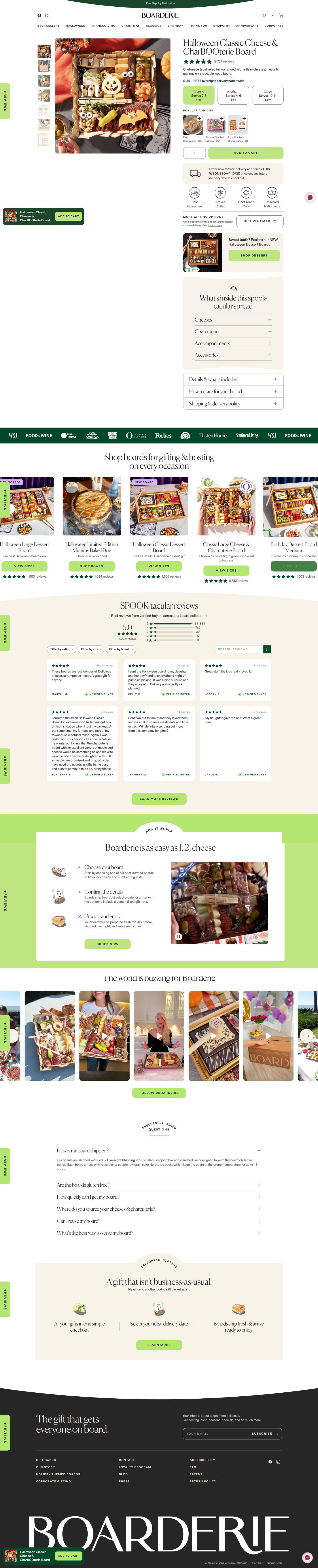
Halloween Classic Cheese & CharBOOterie Board
Boarderie's Halloween Classic Cheese & CharBOOterie Board page is a seasonal gift product page: a compact buy box with serving-size cards, add-ons and a delivery-date callout, then press logos, reviews, how-it-works, a creator carousel and FAQ. 4 Boarderie ads in the Fluid library land here, mostly creator stories about moms sending Halloween boards to adult kids.
- Brand
- Boarderie
- Page type
- Product page
- Ads leading here
- 4
- Captured
- Oct 20, 2026
- Destination
- boarderie.com
Selected for its design and offer structure. Ad performance isn’t available in this collection.
What this page does well
Boarderie carries the season with photography and punny headings over its standard product template, which lets several Halloween ads share one page without a custom build. The buy box answers a gift buyer's questions in order: size cards with serving counts and prices, one-tap add-ons, then a delivery-date callout under Add to cart naming the earliest arrival day with the option to pick a later date. Four round icons cover freshness, chilled arrival, made daily and nationwide delivery, and a cross-sell card for the seasonal dessert boards sits right in the buy column. A creator video carousel lower down echoes the creator ads that bring people here.
How the page is built
- 01Announcement bar and header
A free-shipping line and occasion links answer the shipping question and let visitors jump to other events.
- 02Buy box
A themed product photo with thumbnails (including a menu card), star rating, price with free delivery, size cards with serving counts and add-on tiles answer what it is, how many it feeds and what it costs.
- 03Purchase block
Add to cart, a delivery-date callout with a pick-a-later-date option, four icons and Gift via email answer whether it will arrive by Halloween and in good shape.
- 04In-column extras
A seasonal dessert cross-sell, a themed what's-inside card and details, care and shipping accordions answer what's included and offer a second board.
- 05Press logo strip
Logos on a dark band answer whether the brand is credible.
- 06Occasion carousel
Product cards with New tags let visitors browse other boards.
- 07Reviews
A themed headline, average score, filters and short verified reviews answer whether buyers were happy.
- 08How it works
Three illustrated steps (choose, confirm date and gift note, unwrap) beside a product video explain how sending works.
- 09Creator carousel
A row of creator video thumbnails echoes the creator ads that send people here.
- 10FAQ
Six accordions on shipping, dietary needs, timing, sourcing, reuse and serving handle last questions.
- 11Corporate gifting and footer
A corporate card and newsletter signup catch business buyers and people not ready yet.
What's missing, in the order we'd fix it
- The ads lean on scarcity (limited quantities, sell-out claims) and Halloween timing, but the buy box shows neither a last order date for Halloween nor any limited-batch note. Add both right under the price, so the urgency from the ads has a date to act on.
- Most ads are about a parent sending this to a grown kid, and the page never mentions that. A short line by the gift-note option (send it to your kids at college or in their first apartment) would pick up the ads' main story.
- The page doesn't speak to the host buyer from the Lori Greiner ad. A line near the size cards about planning for a Halloween party, paired with the serving counts, would serve both buyers.
How the ads set it up
The creator ads set up a story the page only half finishes. Videos about a mom sending a CharBOOterie board because her kid is too old to trick-or-treat, and an adult son who got one overnight and chilled, promise freshness, overnight delivery and a limited run. The page backs up freshness and delivery with its icons and delivery-date callout, and the creator carousel matches the ads' style. The parent-to-adult-kid framing and the scarcity never appear near the buy box, so visitors arrive on a well-built but generic seasonal product page.
What to borrow for your brand
- Theme a seasonal product with photography and punny headings over your standard template, so several holiday ads can share one page without a rebuild.
- Put a cross-sell card for the matching seasonal product inside the buy column, so a second board is one tap away while the buyer is already deciding.
- Add a creator video carousel lower on the page that mirrors the creator ads, so visitors see more of what convinced them to click.
Ads that send people here
- How Boarderie sells a Halloween board to parents of grown-up kids
- How Boarderie turns a doorstep delivery into a Halloween gift ad
- How Boarderie targets parents of adult sons with a Halloween board
- How Boarderie pitches its Halloween board to hosts with Lori Greiner
Captured from boarderie.com in October 2026 for the Fluid Inspiration Library. Offers and prices change; this is what the page showed when we captured it.