

BoarderieSponsored
Esc
How Boarderie's corporate gifting page serves small and bulk buyers
Boarderie's corporate gifting page is a dedicated business landing page with two buying paths: self-serve ordering to many addresses and a concierge for large orders. A format chooser, size-tabbed product carousel, concierge section and logistics FAQ carry it. 2 Boarderie ads in the Fluid library land here, both holiday corporate gift videos.
Boarderie
2 creatives lead here1 / 2

Boarderie corporate gifting
Captured from the official Boarderie advertiser results in the public Meta Ad Library on October 20, 2026. Animated media is represented by a still. Product pages combine the browser’s static product section with native scrolling captures below at a verified shared boundary, avoiding repeated sticky galleries while retaining loaded images. Current offers and page variants may differ from the original creative.
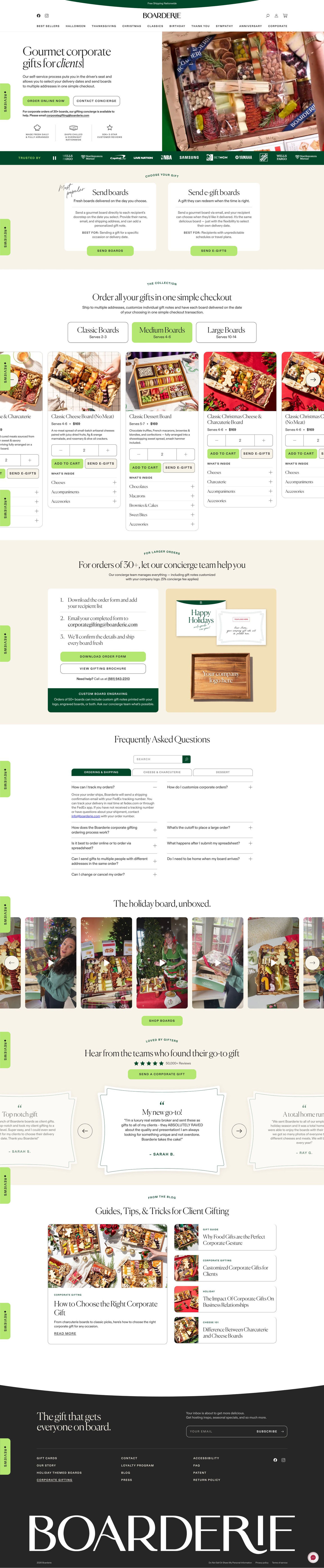
Boarderie corporate gifting
Boarderie's corporate gifting page is a dedicated business landing page with two buying paths: self-serve ordering to many addresses and a concierge for large orders. A format chooser, size-tabbed product carousel, concierge section and logistics FAQ carry it. 2 Boarderie ads in the Fluid library land here, both holiday corporate gift videos.
- Brand
- Boarderie
- Page type
- Campaign landing
- Ads leading here
- 2
- Captured
- Oct 20, 2026
- Destination
- boarderie.com
Selected for its design and offer structure. Ad performance isn’t available in this collection.
What this page does well
The hero gives every business buyer a next step from the first screen. Order Online covers self-serve ordering to multiple addresses in one checkout, Contact Concierge covers bulk orders (with an email and a note about large orders), and three proof points for made fresh, ships chilled and star reviews sit underneath. A Trusted by logo strip follows immediately, which is the proof a corporate buyer looks for first. The gift-format chooser then settles physical versus e-gift with a Best for line on each card, and the product carousel has both Add to Cart and Send E-Gifts buttons with a quantity stepper, so a multi-recipient order can be built without leaving the page.
How the page is built
- 01Announcement bar and header
A free-shipping line and occasion categories answer the shipping question and keep the main store one click away.
- 02Hero
A headline with a rotating recipient word, Order Online and Contact Concierge buttons, a bulk-order note and three proof points answer whether this works for my company and how I start.
- 03Client logo strip
A Trusted by band of corporate logos answers whether other companies use it.
- 04Gift-format chooser
Physical delivery (tagged Most popular) and e-gift cards, each with how it works and a Best for line, answer which format suits my recipients.
- 05Collection
Size tabs with servings and a carousel of product cards with quantity, Add to Cart and Send E-Gifts answer what I can send and how to order for many people.
- 06Concierge for large orders
A three-step process, order form and brochure downloads, a phone line and a your-company-logo-here engraving mockup answer how bulk and branded orders work.
- 07FAQ
A searchable, tabbed accordion grid on ordering, shipping and product types handles logistics questions.
- 08Unboxing videos
A carousel of vertical customer videos shows what recipients experience.
- 09Testimonials
A star rating with count, a Send a Corporate Gift button and quote cards answer whether buyers were happy.
- 10Blog
A featured article and smaller guide cards give planners more reading.
- 11Newsletter and footer
An email signup and link columns catch buyers who aren't ready to order.
What's missing, in the order we'd fix it
- There's no deadline for holiday delivery, even though both ads are holiday gift videos and corporate orders take planning. Add an order-by date for holiday arrival in the hero, next to the two buttons.
- Pricing for volume isn't visible: the concierge section mentions a fee note but no volume discount. If there's a price break for larger orders, show it on the collection cards so self-serve buyers know when to switch to concierge.
- The unboxing videos and testimonials sit low on a long page. Move one short recipient reaction (like the employee unboxing ad) up near the format chooser, so the buyer sees the result before choosing.
How the ads set it up
Both ads are holiday videos, one a creator pitching the board as a deal-closing gift with the date picker on screen, the other an employee unboxing what her company sent. The page answers what both leave open: sending to many addresses in one checkout, choosing a delivery date, bulk orders and a company logo on the gift. The unboxing carousel matches the employee ad's style. It's the best ad-to-page fit in Boarderie's set, and the remaining gap is the holiday deadline neither the ads nor the page state.
What to borrow for your brand
- Offer two parallel paths in the hero (self-serve and concierge), so both a manager sending ten gifts and a team sending hundreds have a next step.
- Put a format chooser with a Best for line on each option before the catalog, so buyers settle physical versus digital before browsing.
- Show a mockup of the buyer's logo on the product, so personalization is something they can picture instead of a bullet point.
Ads that send people here
- How Boarderie sells its holiday board as a corporate gift
- How Boarderie sells corporate gifts through an employee's unboxing
Captured from boarderie.com in October 2026 for the Fluid Inspiration Library. Offers and prices change; this is what the page showed when we captured it.